C Programming

Binary search algorithm

Posted In: . By Caztial

Binary search algorithm

Generally, to find a value in unsorted array, we should look through elements of an array one by one, until searched value is found. In case of searched value is absent from array, we go through all elements. In average, complexity of such an algorithm is proportional to the length of the array.
Situation changes significantly, when array is sorted. If we know it, random access capability can be utilized very efficiently to find searched value quick. Cost of searching algorithm reduces to binary logarithm of the array length. For reference, log2(1 000 000) ≈ 20. It means, that in worst case, algorithm makes 20 steps to find a value in sorted array of a million elements or to say, that it doesn't present it the array.

Algorithm

Algorithm is quite simple. It can be done either recursively or iteratively:
  1. get the middle element;
  2. if the middle element equals to the searched value, the algorithm stops;
  3. otherwise, two cases are possible:
    • searched value is less, than the middle element. In this case, go to the step 1 for the part of the array, before middle element.
    • searched value is greater, than the middle element. In this case, go to the step 1 for the part of the array, after middle element.
Now we should define, when iterations should stop. First case is when searched element is found. Second one is when subarray has no elements. In this case, we can conclude, that searched value doesn't present in the array.

Examples

Example 1. Find 6 in {-1, 5, 6, 18, 19, 25, 46, 78, 102, 114}.
Step 1 (middle element is 19 > 6):     -1  5  6  18  19  25  46  78  102  114
Step 2 (middle element is 5 < 6):      -1  5  6  18  19  25  46  78  102  114
Step 3 (middle element is 6 == 6):     -1  5  6  18  19  25  46  78  102  114
Example 2. Find 103 in {-1, 5, 6, 18, 19, 25, 46, 78, 102, 114}.
Step 1 (middle element is 19 < 103):   -1  5  6  18  19  25  46  78  102  114
Step 2 (middle element is 78 < 103):   -1  5  6  18  19  25  46  78  102  114
Step 3 (middle element is 102 < 103):  -1  5  6  18  19  25  46  78  102  114
Step 4 (middle element is 114 > 103):  -1  5  6  18  19  25  46  78  102  114
Step 5 (searched value is absent):     -1  5  6  18  19  25  46  78  102  114
 

Bubble Sort Algorithm

Posted In: . By Caztial

Bubble Sort

Bubble sort is a simple and well-known sorting algorithm. It is used in practice once in a blue moon and its main application is to make an introduction to the sorting algorithms. Bubble sort belongs to O(n2) sorting algorithms, which makes it quite inefficient for sorting large data volumes. Bubble sort is stable and adaptive.

Algorithm

  1. Compare each pair of adjacent elements from the beginning of an array and, if they are in reversed order, swap them.
  2. If at least one swap has been done, repeat step 1.
You can imagine that on every step big bubbles float to the surface and stay there. At the step, when no bubble moves, sorting stops. Let us see an example of sorting an array to make the idea of bubble sort clearer.
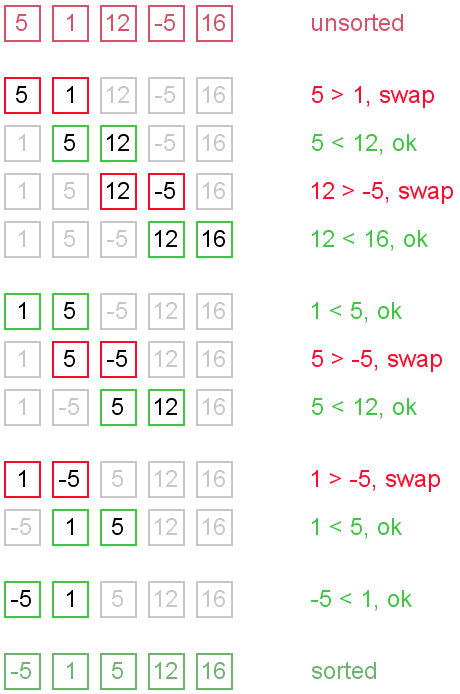
Example. Sort {5, 1, 12, -5, 16} using bubble sort.
Bubble sort example

Complexity analysis

Average and worst case complexity of bubble sort is O(n2). Also, it makes O(n2) swaps in the worst case. Bubble sort is adaptive. It means that for almost sorted array it gives O(n) estimation. Avoid implementations, which don't check if the array is already sorted on every step (any swaps made). This check is necessary, in order to preserve adaptive property.

Turtles and rabbits

One more problem of bubble sort is that its running time badly depends on the initial order of the elements. Big elements (rabbits) go up fast, while small ones (turtles) go down very slow. This problem is solved in the Cocktail sort.
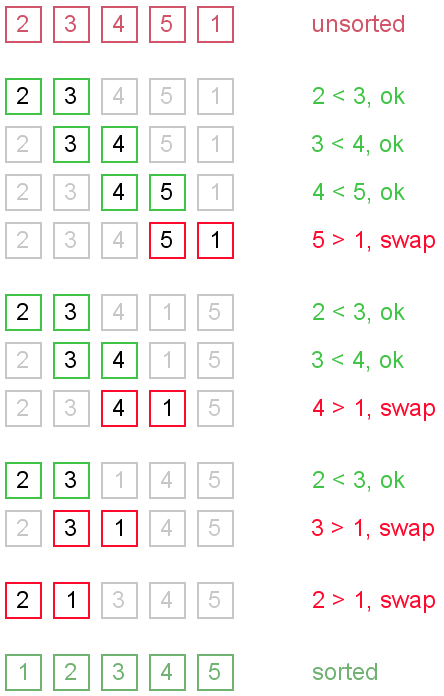
Turtle example. Thought, array {2, 3, 4, 5, 1} is almost sorted, it takes O(n2) iterations to sort an array. Element {1} is a turtle.
Turtle example
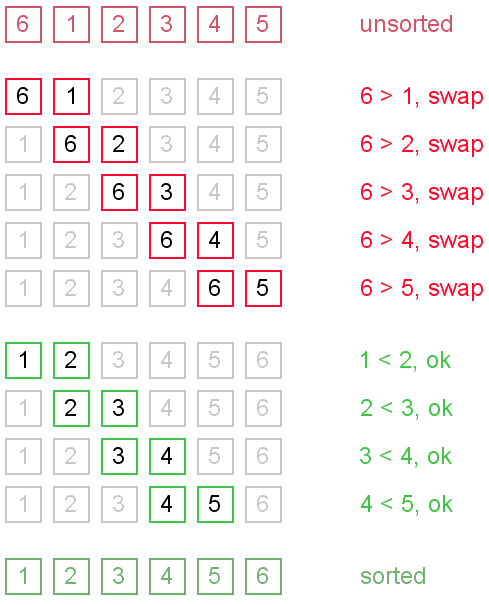
Rabbit example. Array {6, 1, 2, 3, 4, 5} is almost sorted too, but it takes O(n) iterations to sort it. Element {6} is a rabbit. This example demonstrates adaptive property of the bubble sort.
Rabbit example


Binary search

Posted In: . By Caztial

#include
#include
#difine N 10
int V[N];
void bsearch(int V[N]);
void input(int V[N]);
void output(int V[N]);
void main()
{
   input(V);
   bsearch(V);
   output(V);
   getch();
}
void bsearch(int bs[N])
{
    bsort(I);
    int high,low,key,mid=0;
    printf("Input Number to Search\t");
    scanf("%d",&key);
    low=1;    high=N;
    while(mid!=key)
    {
        if(low>=high)
        {    printf("Search Can't Befound");
            break;
        }
        else
        {
            mid=(low+high)/2;
            if(bs[mid]>key)
            {
                high=mid-1;    }
            else
            {
        }        low=mid+1;    }
    }
    if(low<=high)
    printf("loaction is %d",mid);
    getch();
}


Bubble Sort

Posted In: . By Caztial

I include the the function only, and used more variables for the understand of beginners.For the Algorithm look in Tutorials.  
/*Be for you use bubble sort you should enter the data into array, any write a another function to output it, If you see it difficult comment so i can give you all the code.*/ 

#include
#include
#difine N 10
int V[N];
void bsort(int V[N]);
void input(int V[N]);
void output(int V[N]);
void main()
{
   input(V);
   bsort(V);
   output(V);
   getch();
}

void bsort(int b[N])
{
    int k=0,c=0,j,t,e1,e2;
    while(c
    {
    j=0; t=1;
        do
        {    e1=b[j]; e2=b[t];
            if(e1>e2)
            {    k=b[j];
                b[j]=b[t];
                b[t]=k;        }
        j++;
        t++;
        }
        while(j
    c++;
    }
    printf("sorting done.....\n Press Enter to Return to menu\n");
    getch();

}


Array Input and Out put

Posted In: . By Caztial

#include
#include
#define N 5 /* Array size can be vary*/
int I[N];
void input(int I[N]);
void output(int I[N]);

void main()
{
        input(I);
       outout(I);
 }
void input(int In[N])
{

    for(int i=0;i<5;i++)
    {
        printf("Input Array I possition %d\n",i);
        scanf("%d",&In[i]);

    }
}
void output(int O[N])
{
    clrscr();
    for(int q=0;q<5;q++)
    {
        printf("I[%d]= %d\n",q,O[q]);
    }
    getch();
}


#include
#include

void main()
{
    int n=0;
    while(n!=7)
    {
    clrscr();
    printf("Main Menu\n");
    printf("1. Input Number to Array\n");/*Any Selection That you want comes hear*/
    printf("2. Output The Array\n");
    printf("3. Search\n");
    printf("4. Direct Sort\n");
    printf("5. Bubble Sort\n");
    printf("6. Binary Search\n");
    printf("7. Exit\n");
    printf("Enter your Selection :-\t");
    scanf("%d",&n);

        switch (n)/* Switch Case Begins*/
        {
        case 1:/*Note the Collen*/
        {
            input(I);
            break;
        }
        case 2:
        {
            output(I);
            break;
        }
        case 3:
        {
            search(I);
            break;
        }
        case 4:
        {
            dsort(I);
            break;
        }
        case 5:
        {    bsort(I);
            break;
        }
        case 6:
        {
            bsearch(I);
            break;
        }
        }

     }
}


Search This Blog